🔍 Overview :-
YouTube, Instagram, Facebook, and marketing platforms all need high-quality videos. But creating videos manually takes time, editing skills, and expensive software. To solve this problem, InVideo AI was created. It is an advanced AI video generator that can make professional videos from text prompts in just a few minutes.
InVideo AI is used by creators, bloggers, marketers, and students who want fast and easy video creation without editing knowledge. With the help of artificial intelligence, this tool can write script, add voice, choose clips, and generate full videos automatically.
🤖 What is InVideo AI?
InVideo AI is an online AI video creation tool that converts text into video. Users only need to write an idea or topic, and the AI generates a complete video with scenes, music, voiceover, and subtitles.
This tool works using advanced AI models that understand content, create script, select visuals, and produce final video automatically. Because of this automation, video creation becomes very easy even for beginners.
Example prompts:
- Make a YouTube video about AI tools
- Create Instagram reel about motivation
- Create ad for mobile phone
AI will generate video automatically
🔑 Key Features of InVideo AI
1. Text-to-Video Generation:-
InVideo AI allows users to create full videos just by typing a prompt. You only need to write a topic or idea, and the AI automatically generates script, scenes, music, and voiceover. This feature saves a lot of time and makes video creation easy for beginners.
2. AI Script Writer:-
The built-in AI script writer can create a complete script based on your topic.
For example, if you write “Make a video about digital marketing”, the AI will write the script and prepare the video automatically.
This feature is very helpful for YouTubers and bloggers.
3. Automatic Voiceover:-
InVideo AI provides AI voiceover that converts text into natural human-like speech.
You can choose different voices, languages, and tones.
This makes videos sound professional without recording your own voice.
4. Stock Media Library:-
InVideo AI has a large built-in library of stock videos, images, music, and sound effects.
The AI automatically selects the best media according to your script.
This means you don’t need to download clips from other websites.
5. Ready-Made Templates:-
There are thousands of ready templates available in InVideo AI.
You can select a template for YouTube, Instagram, ads, reels, or presentations.
Templates help users create professional videos quickly.
6. Multi-Language Support:-
InVideo AI supports multiple languages.
You can create videos in English, Hindi, Spanish, and many other languages.
Voiceover and subtitles also change according to the language.
7. Platform Optimization:-
The AI automatically adjusts the video format for different platforms.
YouTube → Landscape
Instagram → Vertical
TikTok → Short video
This helps in getting better engageme
Thank you for reading this post, don't forget to subscribe!
8. Fast Video Generation:-
InVideo AI can generate videos in a few minutes.
Manual editing takes hours, but AI makes the process very fast.
This is useful for creators who upload content daily.
9. AI Scene Creation:-
The AI divides the script into multiple scenes and adds text, animation, and clips automatically.
Each line of the script becomes a separate scene, which makes the video look professional.
10. Editing After Generation:-
Even after the video is generated, you can edit text, music, clips, colors, and voice.
This gives users control over the final video.
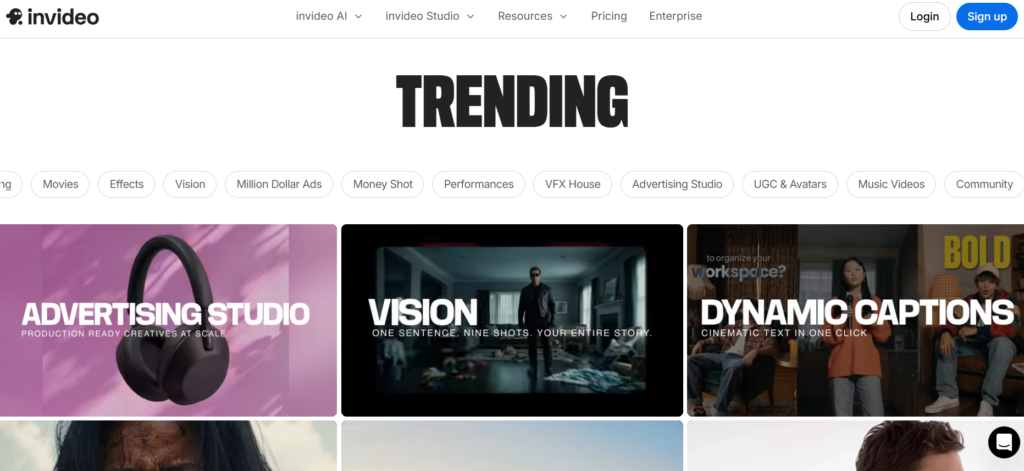
11. AI Avatars and Effects:-
InVideo AI also provides advanced features like:
AI avatars
Subtitles
Animations
Background music
Video effects
These features help in making high-quality videos.
12. Best for Content Creators:-
InVideo AI is best for:
YouTubers
Bloggers
Students
Digital marketers
Social media creators
Affiliate marketers
It helps in creating videos without editing skills.
🛠️ How InVideo AI Works
InVideo AI uses multiple AI models to create videos.
First, the AI understands the idea.
Then it writes a script.
After that, it selects images, videos, and voice.
Finally, it generates the complete video.
This process happens automatically, which saves a lot of time compared to manual editing.
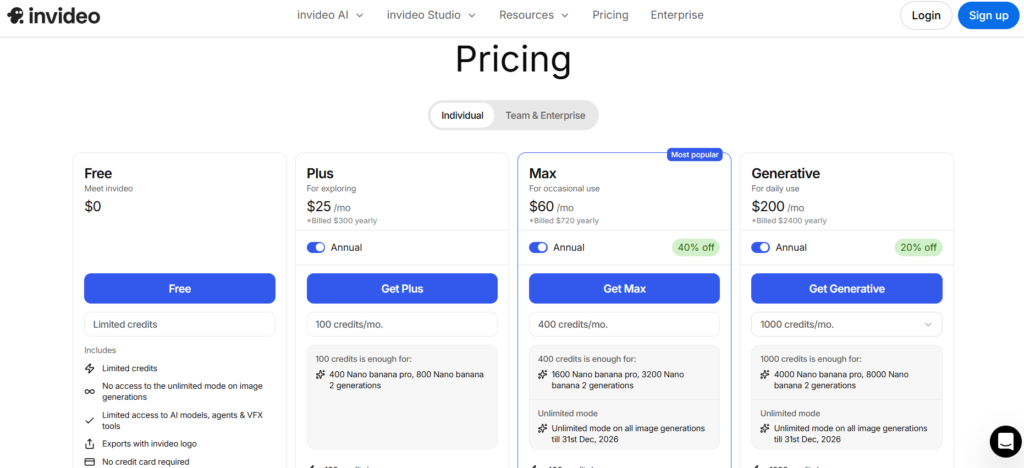
💰 Pricing of InVideo AI
| Plan | Price | Features |
| Free | $0/month | Watermark, limited videos |
| Plus | ~$35/month | More minutes, no watermark |
| Max | ~$60/month | More exports, HD |
| Generative | ~$120/month | AI video generation |
| Team / Enterprise | Custom | For companies |
Free plan is good for beginners, but paid plans give better quality and more limits.
🔥 Why InVideo AI is Popular
There are many reasons why InVideo AI is popular:
- Easy to use
- No editing skill needed
- Fast video creation
- Good for YouTube and reels
- Useful for marketing
- Affordable price
Many creators use InVideo AI to convert blog poats into videos and upload them on social media. This helps in growing traffic and audience.
🧠 Real Life Uses of InVideo AI
InVideo AI can be used for many purpose:
- YouTube videos
- Instagram reels
- Facebook ads
- Blogging videos
- Education videos
- Product promotion
- Afffiliate marketing
Small businesses also use this tool to create ads without hiring video editors.
✅ Advantages
- Fast video creation
- Beginner friendly
- AI voice support
- Many templates
- Online tool Free
- plan available
This makes it one of the best AI video tools for beginners.
❌ Disadvantages
- Free plan has watermark
- Limited credits in paid plan
- Long videos need paid plan
- Sometimes clips not perfect
Some users also sat creadits finish quickly when generating videos.
“Credits were used faster tham expected while editing” – user review on Reddit
⚡ InVideo AI vs Other AI Tools
| Tool | Best For |
| InVideo AI | Full video generation |
| HeyGen | AI avatar video |
| Canva AI | Simple video |
| Pictory | Blog to video |
| Runway AI | Advanced video |
InVideo AI is best for beginners who want full video automatically.
🚀 Who Should Use InVideo AI
You should use InVideo AI if you are:
- Blogger
- YouTuber
- Student
- Digital marketer
- Affiliate marketer
- Social medai creator
📊 Future of InVideo AI
AI video tools like InVideo AI are growing rapidly. In the future, these tools may replace traditional editing for many users. With better AI models, video will become more realistic and coustomizable.
🎯 Conclusion
InVideo AI is a powerful and beginner-friendly tool that makes video creation fast and simple. With features like text-to-video generation, AI script writing, automatic voiceover, and ready-made templates, it removes the need for complex editing skills.
Whether you are a YouTuber, blogger, student, or digital marketer, this tool can help you create professional-quality videos in minutes. While the free plan has some limitations, the overall performance and ease of use make it a valuable choice for content creators.
👉 If you want quick, affordable, and high-quality video creation, InVideo AI is definitely worth trying.
❓ FAQ – InVideo AI
Q1. Is InVideo AI free to use?
Yes, InVideo AI offers a free plan, but it includes a watermark and limited features.
Q2. Can InVideo AI create YouTube videos?
Yes, it can generate full YouTube videos, including script, visuals, and voiceover.
Q3. Do I need editing skills to use InVideo AI?
No, the platform is designed for beginners and works automatically.
Q4. Does InVideo AI provide voiceover?
Yes, it includes AI-generated voiceovers in different languages and styles.
Q5. Is InVideo AI better than other tools?
It is one of the best tools for beginners due to its automation and ease of use.
Q6. Can I edit videos after generation?
Yes, you can customize text, clips, music, and other elements after the video is created.
Q7. Who should use InVideo AI?
It is ideal for YouTubers, bloggers, marketers, students, and small business owners.
Q8. Is InVideo AI worth it?
Yes, especially if you want fast and easy video creation without technical knowledge.
🎉 Welcome to our website!
Thank you for visiting. We hope you found this guide helpful and informative.
If you’re interested in discovering more amazing AI tools, tips, and guides, make sure to explore our website.
🚀 Stay updated, keep learning, and grow with the power of AI!