
🔍Overview:-
In today’s fast-growing AI world, video generation tools are becoming very popular. One of the most trending tools right now is Pika Labs. This AI tool allows users to create high-quality videos using simple text prompts or images. Many bloggers, YouTubers, and content creators are using Pika Labs to make videos without a camera or editing skills. Because of its powerful features and easy interface, Pika Labs is quickly becoming one of the best AI video generator tools in 2026.
🤖 What is Pika Labs AI?
Pika Labs is an AI-powered video generation tool that can turn text, images, or ideas into short videos. You just need to write a prompt, and the AI will automatically generate a video based on your input.
This tool is especially useful for social media creators, YouTube automation channels, and bloggers who want to create content faster.
The best thing about Pika Labs AI is that it is beginner-friendly and does not require professional editing knowledge.
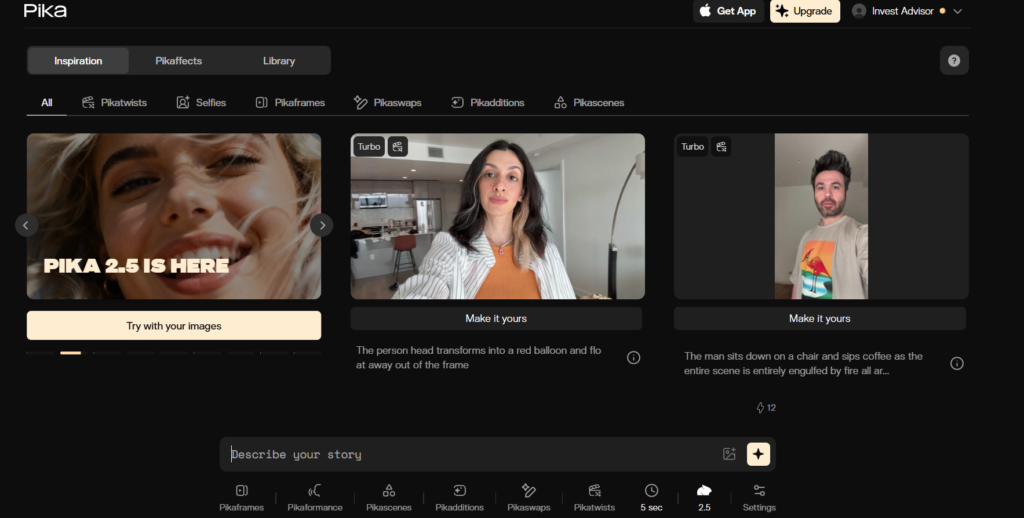
🔑 Key Features of Pika Labs
1.Text-to-Video Generation:-
Pika Labs AI allows users to create videos just by writing a text prompt. You can describe any scene, and the AI will generate a video based on your words. This feature is very useful for creators who want to make videos without recording anything.
Example: You can write “cinematic sunset in mountains” and the AI will create a video automatically.
2. Image-to-Video Conversion:-
With this feature, you can upload an image and convert it into a moving video. The AI adds motion, effects, and animation to make the image look alive. This is helpful for social media creators and bloggers who want engaging content.
Thank you for reading this post, don't forget to subscribe!
3. Cinematic Video Style:-
Pika Labs AI can generate videos with cinematic quality, including lighting effects, camera movement, and realistic scenes. This makes the output look professional even if you are a beginner. Many users use this feature for YouTube videos, reels, and short films.
3. Fast Video Rendering:-
One of the best things about Pika Labs AI is its speed. The AI processes prompts quickly and generates videos in a short time. Compared to many other AI video tools, Pika Labs is faster and smoother.
4. Object Replace / Swap Feature:-
Pika Labs AI has a unique feature where you can change objects or characters inside the video. For example, you can replace a car with a bike or change the background without creating a new video. This makes editing easier and saves time.
5. Character Consistency:-
When creating multiple scenes, Pika Labs keeps the same character style in every frame. This feature is very important for storytelling, animation, and YouTube videos where the same character appears in different scenes.
6. High-Quality Video Export:-
Pika Labs AI supports HD quality video output. The generated videos look clear and professional, which is perfect for YouTube, Instagram, ads, and blogging content.
7. Beginner Friendly Interface:-
The interface of Pika Labs AI is simple and easy to understand. Even if you have never used video editing software before, you can still create videos in a few clicks. This is why many beginners prefer Pika Labs over complex tools.
8. AI Animation Effects:-
The tool automatically adds animation effects, motion, and transitions. You do not need to edit manually. This saves a lot of time and makes the video look more attractive.
9. Cloud-Based Tool:-
Pika Labs AI works online, so you do not need to install any software. You can use it from mobile, laptop, or computer. This makes it very convenient for bloggers and creators.
🛠️ How to Use Pika Labs AI
- Open the official website
- Sing up or log in
- Write a prompt
- Click generate
- Download the video
👉 Example prompt:
A cinematic scene of a boy walking in the forest, 4k, realistic
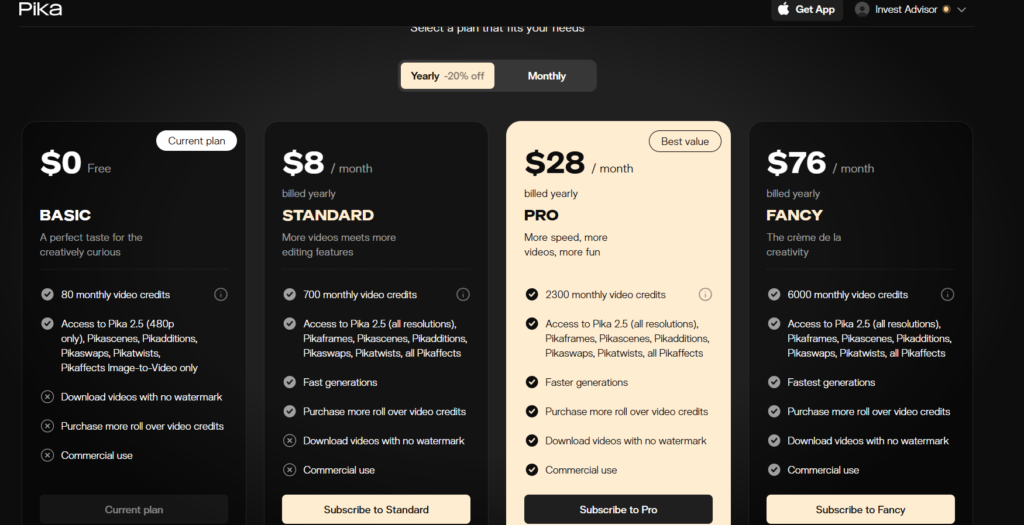
💰 Pricing of Pika Labs
| Plan | Price | Details |
| Free | $0 | Limited credits |
| Standard | Paid | More credits |
| Pro | Paid | Faster generation |
| Premium | Paid | High quality videos |
The Free plan is good for beginners, but heavy users , may need a paid plan
⭐Pros and Cons
✅ Pros:
- Easy to use
- Fast video generation
- Free plan available
- Trending AI tool
- No editing skills needed
❌ Cons:
- Limited credits in free plan
- Long video support is limited
- Paid plans are expensive
🔥 Why Pika Labs is Popular
Pika Labs is popular because AI video content is growing very fast.
Creators want tools that save time, and Pika Labs does exactly that.
It is widely used for:
• YouTube automation
• Instagram reels
• Short videos
• AI storytelling
•Marketing videos
Because of this trend, writing a blog about Pika Labs can bring good traffic from Google.
⚡ Best Use Cases
- YouTube videos
- Instagram reels
- AI short films
- Story animation
- Ads and marketing videos
- Blogging content
🧠 Real Life Experience with Pika Labs
When I first tried Pika Labs, the experience was surprisingly simple and fast. I only wrote a short prompt, and within a few seconds the AI generated a short cinematic video. For beginners, this feels amazing because normally video editing takes a lot of time and skill, but here everything happens automatically. Many creators online also say that Pika Labs saves hours of work when making short videos or reels.
In real use, the tool works best for short clips, animations, and social media content. I noticed that when the prompt is clear and detailed, the video quality becomes much better.
For example, writing “cinematic sunset, realistic, 4K, smooth camera movement” gives better results than writing only “sunset video”. This shows that prompt quality matters a lot when using this tool.