🔍Quick Intro:-
Notion AI is one of the most powerful AI productivity tools in 2026. It helps users write notes, manage tasks, create content, and organize work in one place. Many students, bloggers, and professionals use Notion AI to save time and work faster.
Notion AI works inside the Notion workspace, so you can write, plan, and manage everything without switching to another tool. It can generate content, summarize text, translate pages, and even create databases automatically
.
✅ What is Notion AI ?
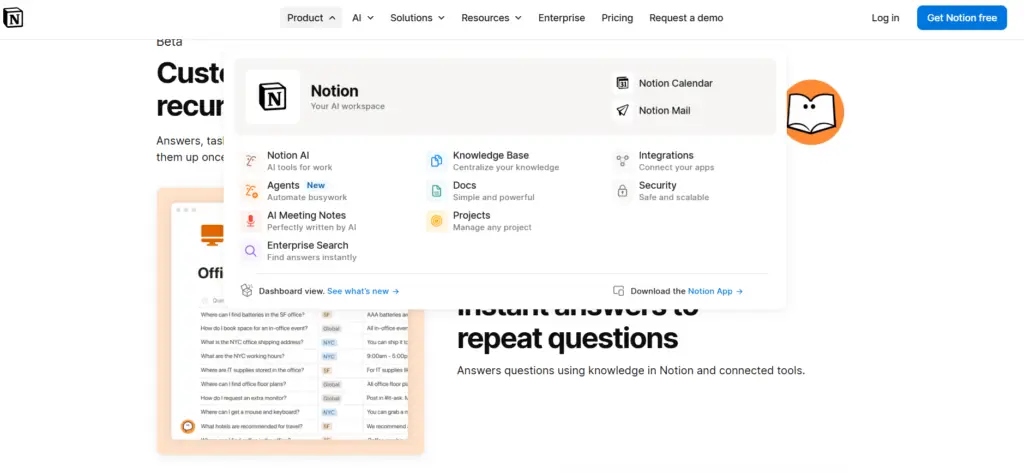
Notion AI is an AI assistant built inside Notion that helps users complete tasks, write content, and manage projects. It can search your workspace, create notes, summarize meetings, and generate ideas.
It is used for :
- Notes writing
- Blog planning
- Task management
- Study notes
- Content creation
- Project planning
Notion AI can also connect with other apps and find information quickly, making it a complete productivity tool.
🔑 Key Features Of Notion AI:-
📝 AI Notes Writing:-
Notion AI can write notes automatically.
You can give a topic, and the AI will generate full notes.
It can also:
• Fix grammar
• Make summary
• Expand text
• Rewrite content
This is useful for students and bloggers.
📄 AI Summary and Research:-
Notion AI can read long text and make short summary.
This saves time when reading articles or books.
You can use it for:
• Study notes
• Meeting notes
• Blog research
• Project report
It can even generate full reports using your workspace data.
📊 Task and Project Management:-
Notion AI helps manage work using database and task list.
• You can create:
• To-do list
• Study planner
• Blog planner
• Project tracker
• Daily schedule
AI can also auto-fill database and organize data.
🤖 AI Content Generator:-
Notion AI can generate content like ChatGPT.
You can create:
• Blog post
• Ideas
• Email
• Script
• Notes
• Outline
This helps bloggers and writers work faster.
🌐 Meeting Notes and Translation:-
Notion AI can write meeting notes automatically and translate text into other languages.
Features:
• Meeting summary
• Auto notes
• Translation
• Key points
• Action list
This feature is useful for office work and study.
🔎 Smart Search & Workspace AI:-
Notion AI can search inside your workspace and find information quickly.
It helps you do research faster without opening many apps.
📚 Auto Summary & Meeting Notes:-
Notion AI can create summaries of documents, lectures, and meetings.
It also generates key points and action lists automatically.
🚀 How to use Notion AI
Using Notion AI is very easy. You only need a Notion account, and then you can start using AI features inside your workspace.
- Create a Notion Account
- Open a Page
- Use Ai Command
- Give Instruction
- Edit & Save
🔥 Why Notion Ai so Popular
Notion AI is easy to use because it works inside the Notion workspace. You just need to create a page and type /AI to start using AI features like writing, summarizing, planning, and generating ideas. It is very popular because it combines notes, task management, and AI content generation in one place. Students, bloggers, and professionals use Notion AI to save time, stay organized, and increase productivity.
✅ Disadvantages
- ✔ All-in-one productivity tool
- ✔ Notes, planning, and AI in one place
- ✔ Best for students and bloggers
- ✔ Saves time
- ✔ Easy to use
- ✔ Works online
❌ Disadvantages
- Full AI features are not free
- Paid plan required for advanced tools
- Beginners may need time to learn
- Internet connection required
💰 Notion AI Pricing
Features is limited.
Plans:
- Free plan – limited AI
- AI add-on – paid
- Business plan – full AI
- Enterprise – advanced features
🎓 Who Should Use Notion AI
Best for:
- Students
- Bloggers
- Website owners
- Content writes
- Office workers
- Developers